Token Management
The Workbench uses two kinds of tokens:
- A session token is automatically issued when a user successfully authenticates with a username and password; session tokens are short-lived (24 hours) and are used by interactive users.
- An API token is a long-lived credential created explicitly via the CLI or the Workbench console; used for machine-to-machine access by service accounts or regular users. A service account may only authenticate with a token.
A token's scope restricts it to a subset of the owning user's permissions. A token without scope restrictions inherits the full access of the owner. The system supports three scope types:
- Connection scope limits the token to specific database connections with a
per-connection access level of
readorread_write. A token scope can further restrict access toreadeven when the owning user hasread_writeaccess through group membership. The system always enforces the more restrictive level. - MCP privilege scope limits the token to specific MCP tools.
- Admin permission scope limits the token to specific administrative operations.
Each scope type supports a wildcard option that grants access to all items of that type:
All Connectionsusesconnection_id=0to match every connection the owner can access.All MCP Privilegesusesprivilege_identifier_id=0to match every MCP privilege the owner holds.All Admin Permissionsuses*to match every ADMIN permission the owner holds.
The effective access for a scoped token equals the intersection of the owner's group-level access and the token scope.
Note
A token cannot exceed the access level of the owner.
Creating a Token
You can create a token with the Workbench console or at the command line.
To use the console to create a token, navigate to the Administration page,
and select Tokens from the left navigation pane. When the Tokens page opens,
select the + Create Token icon to open the Create token dialog:
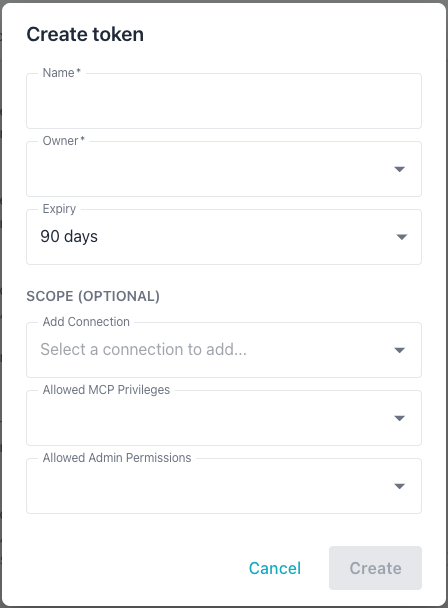
Provide the following information in the Create token dialog:
- The
Namefield sets the token annotation; use up to 255 characters. - Use the
Ownerdrop-down to select the user who owns the token; the token's effective access cannot exceed the owner's access. - The
Expirydrop-down sets the token lifetime; the choices are 30 days, 90 days, 1 year, or Never, defaulting to 90 days. - The
Add Connectiondrop-down adds a database connection to the token's scope; repeat this step to add multiple connections. The drop-down shows only connections the selected owner can access, and displaysNo optionswhen the owner has no connections assigned. After adding a connection, the access level defaults to the owner's maximum level for that connection; you can lower it toread. - The
Allowed MCP Privilegesdrop-down restricts the token to specific MCP tools; theAll MCP Privilegeswildcard grants every MCP privilege the owner holds. - The
Allowed Admin Permissionsdrop-down restricts the token to specific admin operations; theAll Admin Permissionswildcard grants every admin permission the owner holds.
The Create button is disabled until both the Name and Owner fields are
completed; select Create to create the described token.
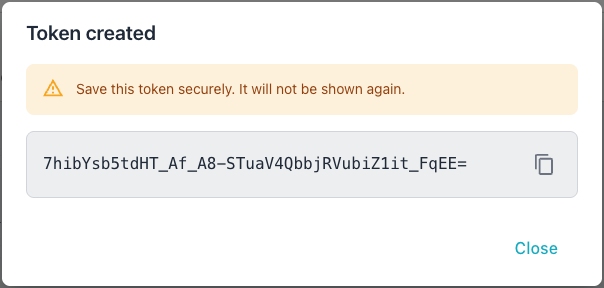
You can also create a token at the command line. In the following example, the
-add-token flag starts token creation in interactive mode, prompting you for
token details:
./bin/ai-dba-server -add-token
When prompted, provide the following:
- Owner username (required)
- Annotation or note (optional)
- Expiry duration (e.g.,
30d,1y,never)
The syntax used to create a token in non-interactive is the same for a user
account or a service account; specify token properties in key/value pairs when
invoking the -add-token command:
# Create token for a user
./bin/ai-dba-server -add-token \
  -user alice \
  -token-note "CI/CD Pipeline" \
  -token-expiry "90d"

# Create token for a service account
./bin/ai-dba-server -add-token \
  -user svc-bot \
  -token-note "Automation" \
  -token-expiry "never"
The -add-token command accepts the following expiry format strings:
30dspecifies 30 days.1yspecifies 1 year.2wspecifies 2 weeks.12hspecifies 12 hours.1mspecifies 1 month (30 days).neverspecifies that the token never expires.
The command displays the token upon creation:
===========================================================
Token created successfully!
===========================================================

Token: <generated-token-value>
Hash:  <token-hash>
ID:    1
Owner: alice
Note:  CI/CD Pipeline
Expires: 2025-01-28T10:15:30-05:00
===========================================================

IMPORTANT: Save this token securely - it will not be
shown again! Use it in API requests with:
Authorization: Bearer <token>
===========================================================
Listing Tokens
You can review a list of tokens in either the Workbench console or at the command line.
Tokens appear on the Tokens tab in the Administration console:
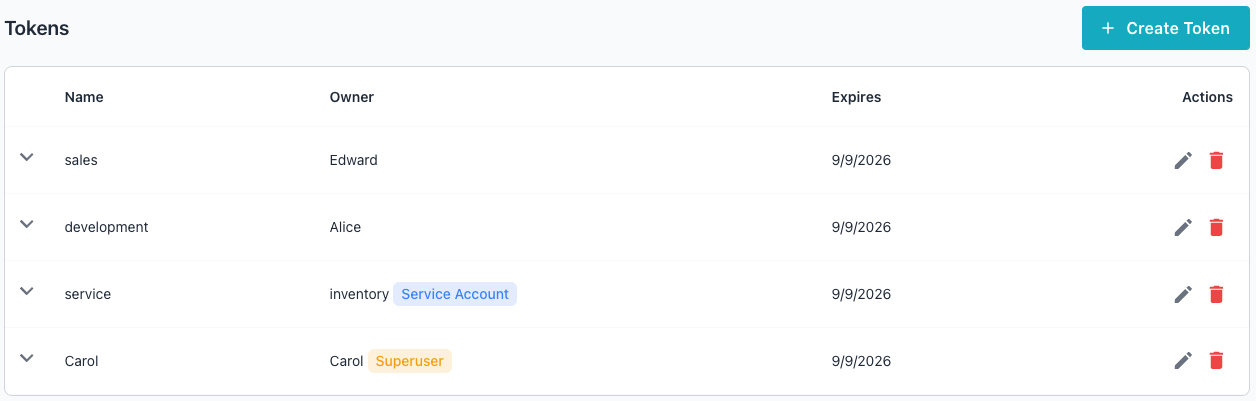
You can also display a list of tokens at the command line. In the following
example, the -list-tokens command displays a list of tokens:
./bin/ai-dba-server -list-tokens
The information displayed includes the token's ID, the hash prefix, the token owner, if the account is a superuser, if the account is a service account, the token expiration details, and current status:
Tokens:
======================================================================
ID   Hash Prefix        Owner     Super  Svc    Expires          Status
----------------------------------------------------------------------
1    <hash-prefix-1>    alice     No     No     2025-01-28 10:15 Active
2    <hash-prefix-2>    svc-bot   No     Yes    Never            Active
3    <hash-prefix-3>    bob       No     No     2024-10-15 14:20 EXPIRED
======================================================================
Removing Tokens
You can delete a token in the Workbench console's Tokens table or at the
command line. To delete a token in the console, select the Delete icon
(the garbage can) at the far-right of a token entry. A popup opens, asking
you to confirm that you wish to delete the token:
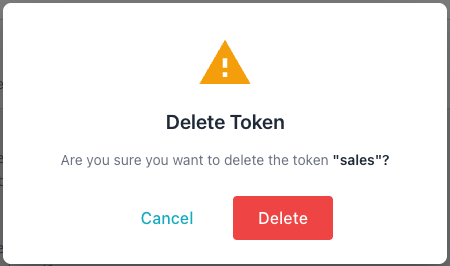
Select Delete to permanently delete the specified token.
You can also delete a token at the command line with the -remove-token
command and the token ID or hash prefix; in the following examples,
-remove-token deletes an API token by its ID and hash prefix:
# Remove by token ID
./bin/ai-dba-server -remove-token 1

# Remove by hash prefix (minimum 8 characters)
./bin/ai-dba-server -remove-token <hash-prefix>